Quick Verdict
Our tips for the AliveCor KardiaMobile 1‑Lead Personal ECG Monitor, AI-scored 9.0/10.
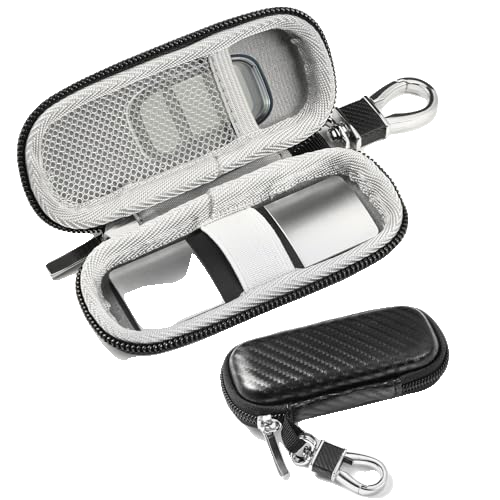
⭐ Featured in this article
AliveCor KardiaMobile 1‑Lead Personal ECG Monitor
1. Master the Proper Hand Placement Technique
The accuracy of your AliveCor KardiaMobile depends heavily on correct hand placement. Place two fingers from each hand on the device's metallic electrodes—typically your index and middle fingers work best. Ensure your fingers are moisturized but not wet, as the ultrasonic signal needs good skin contact to transmit data to your smartphone. Hold the device steady for the full 30 seconds without talking or moving. Many users get clearer readings by sitting down and resting your arms on a table, minimizing muscle movement that can create artifacts on the ECG trace.
2. Take Readings at Consistent Times Daily
Building a routine helps you establish a baseline for your personal ECG patterns and makes it easier to spot anomalies. Consider taking a reading every morning before getting out of bed, as this is when your heart rate is naturally lower and more stable. If you're monitoring for specific concerns like atrial fibrillation, additional readings during mid-afternoon and evening can provide a more complete picture of your rhythm throughout the day. Consistency matters more than frequency—daily readings at the same time create reliable data your doctor can analyze.
3. Keep Your Smartphone Battery Healthy
Since the KardiaMobile operates wirelessly via ultrasonic signal and communicates with your phone, ensure your device battery is sufficiently charged before taking readings. A dying smartphone battery can sometimes interfere with data transmission or cloud synchronization. Keep the Kardia app updated to the latest version, as updates often include bug fixes and improved connectivity features. If you notice frequent sync failures, try restarting your phone before your scheduled reading time.
4. Understand the Limitations of Single-Lead Monitoring
The KardiaMobile 1-Lead is FDA-cleared to detect four key conditions: atrial fibrillation, normal sinus rhythm, tachycardia, and bradycardia. However, it cannot provide the comprehensive diagnostic information of a clinical 12-lead ECG or even AliveCor's 6-lead model. Use this device as a screening and monitoring tool, not as a replacement for professional medical evaluation. If you have complex cardiac concerns or need detailed arrhythmia classification, discuss with your cardiologist whether a more comprehensive device might be appropriate for your situation.
5. Leverage the Kardia App's Data History and Sharing Features
Don't just take readings and ignore them—actively review your data trends in the Kardia app. The app displays your reading history with clear visual indicators for any detected irregularities. Take advantage of the built-in sharing feature that lets you export your ECG readings directly to your healthcare provider. Many cardiologists find these personal recordings invaluable for diagnosing intermittent rhythm issues that might not show up during a brief office visit. Screenshot or save readings that concern you before sharing with your doctor.
6. Consider the KardiaCare Subscription for Advanced Insights
While the basic KardiaMobile functionality is excellent, the optional KardiaCare subscription (~$99/year) unlocks AI-powered rhythm interpretations beyond the core four detections. This includes identification of various arrhythmia types and patterns that might warrant closer medical attention. If you're actively monitoring a known condition or have a family history of heart disease, the subscription provides peace of mind through more detailed analysis. Think of it as investing in more sophisticated personal health data—assess your individual needs and medical situation to determine if it's worthwhile for you.
7. Create a Reading Log Beyond the App
Supplement the Kardia app with a simple spreadsheet or journal noting when you take readings and any symptoms you experienced around that time (palpitations, shortness of breath, dizziness, etc.). This context helps your doctor correlate your ECG patterns with your reported symptoms. Note factors like caffeine intake, stress level, sleep quality, and exercise, as these influence heart rhythm. Over weeks and months, you may notice patterns that neither you nor the app alone would catch.
Common Mistakes to Avoid
Don't rely solely on KardiaMobile results for diagnosis. This device screens for conditions and provides useful data, but only a qualified cardiologist can make a definitive diagnosis. Always consult your doctor about any concerning readings rather than self-diagnosing based on app results.
Don't take readings immediately after caffeine, intense exercise, or high stress. These factors artificially elevate heart rate and can trigger false alerts. Wait at least 30 minutes after caffeine or exercise for baseline readings.
Don't ignore patterns just because individual readings seem normal. One normal ECG doesn't rule out intermittent arrhythmias. Persistent patterns across multiple readings carry more diagnostic weight.
Don't forget to maintain good electrode contact. Dry skin, calluses, or insufficient finger pressure on the metallic surface compromises signal quality and can produce unreadable traces.
Ready to buy?
AliveCor KardiaMobile 1‑Lead Personal ECG Monitor
View on Amazon →Affiliate link — we may earn a commission at no extra cost to you
Get AI-curated deals like these every week
Free picks from our research engine. No spam — unsubscribe anytime.
No comments yet — be the first to share your experience.